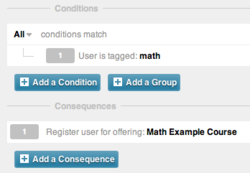
All that was asked what that you post with the hashtag #ifihadglass. I didn't waste anytime at all and quickly thought about things that I would do. The obvious choice for me was something on the DigitalChalk platform. Here is what I responded with:

After that, I really forgot about it until the Twitter account of Project Glass (@projectglass) responded to me a little over a month later letting me know that I was chosen to be a part of the program.

I was certainly excited to see that and then the wait began. I waited for 3 months before hearing from Project Glass again. I started to wonder if maybe they had eliminated me as a participant or even forgot about some. Then, on June 21st I got a direct message from them that invited me to schedule my pickup in New York City. That night I went online, ordered Glass and booked my plane tickets.
This past weekend, I flew to New York to pick them up. We were able to invite one person to go with us to the pickup and I asked my brother-in-law to go since he lives in New York near the city. We met at Starbucks across the street in Chelsea Market and then walked over the Google offices where the pickup for Project Glass was located. We were greeted as soon as we got off of the elevator by two people in reception wearing Glass and they checked us in and gave us guest badges marked with Explorer Edition.

After a very brief wait, we were met by our Glass Guide, Sunil who was awesome. He took us back to his station and then let us try on all of the different colors of Glass. Even though I had specified the color online when I purchased them, he asked if I would like to switch.

I chose to stick with Shale and by the time we got back from the fitting station, someone had brought a new box to the desk with a Shale pair of Glass. After a quick chat, I proceeded with the unboxing and Sunil let me through fitting them to my face and then through the basic setup of connecting them to my phone and to the wireless network. The phone is connected through Bluetooth pairing and connecting to the wireless network was made easy by inputing the connection information in my glass profile online and then scanning a QR code with my Glass to configure them.
Sunil then let me up on to a platform overlooking the New York City skyline, complete with the Freedom Tower in the distance. Here he taught me how to take pictures and video in different ways and how to perform a Google search with Glass.

We then returned to our station and Sunil answered a few more questions and showed me how to make phone calls and share activity from Glass. The entire appointment only lasted about an hour and fifteen minutes but a lot of ground was covered. It was time to return our badges and hit the streets of New York with them on.

It was odd leaving the building with this device on my head, but it quickly became less and less noticeable to me. I have had them for two days now and have worn them to church and to work. One of the great things about wearing them around is letting kids try them out when they ask. The excitement on their faces is so evident. They almost always start laughing and smiling. It is great to watch and be a part of opening up a whole new world to them. I think this will certainly be a part of their future. There are not that many applications right now written for them, but as they become available, the use for Glass will only grow and become more embedded in our lives. I feel fortunate to have the ability to be one of the few able to test these out and write some applications for Glass. If you would like to follow me on Google+, that is where I will most likely be sharing most of the pictures and videos that I take with Glass, you can do so here:
I can't wait to see what the future holds!